Tutorial 18: Visualizing conflicting phylogenetic signal with splits networks
Objectives
Complete the visualizing conflicting phylogenetic signal with splits networks workflow.
Interpret the reported values and generated artifacts in their scientific context.
Identify the canonical command references for each analysis step.
Prerequisites and working directory
Install the current PhyKIT release and create a dedicated working directory. Download the data linked in this tutorial into that directory before running the commands. All paths below are relative to this directory.
mkdir phykit-tutorial-18
cd phykit-tutorial-18
Workflow
When analyzing phylogenomic datasets, different genes often support
conflicting tree topologies. PhyKIT's consensus_network command
(aliases: consnet, splitnet, splits_network) extracts
bipartition splits from gene trees, counts their frequency, and
optionally visualizes them as a circular splits network.
Download test data:
Four example gene trees
Step 1: Prepare a gene-tree file
The downloaded file contains one Newick tree per line:
((A,B),((C,D),(E,F)));
((A,B),(C,(D,(E,F))));
((A,B),((C,D),(E,F)));
(((B,C),A),(D,(E,F)));
Step 2: Run the consensus network analysis
phykit consnet -t consensus_network_tutorial.nwk
This prints a summary of all splits found above the default threshold (0.1):
Number of input trees: 4
Number of taxa: 6
Threshold: 0.1
Total unique splits: 3
Splits above threshold: 3
---
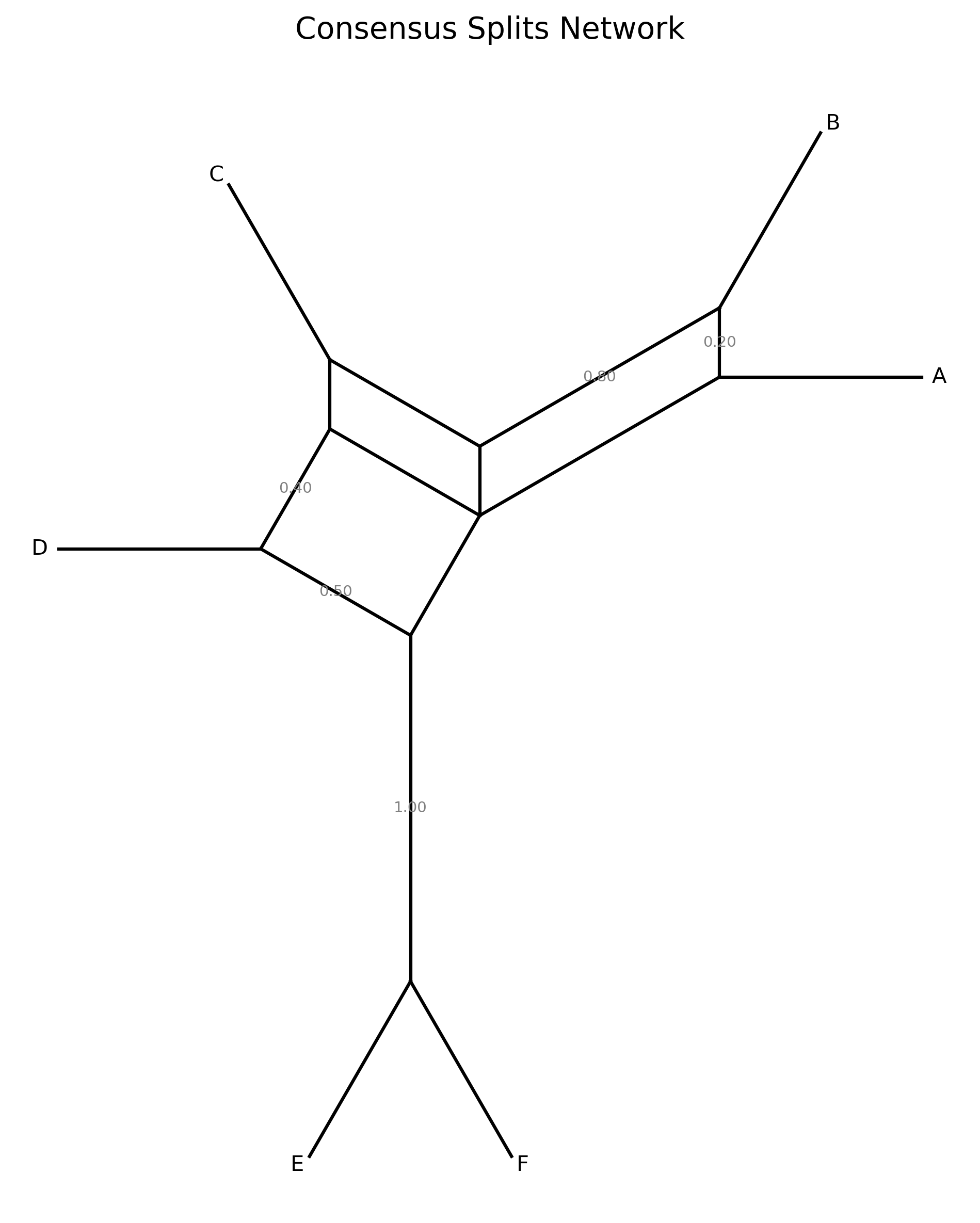
{E, F}   4/4   1.0000
{A, B}   3/4   0.7500
{C, D}   2/4   0.5000
Step 3: Adjust the threshold
To show only splits present in at least 50% of gene trees:
phykit consnet -t consensus_network_tutorial.nwk --threshold 0.5
Step 4: Generate a circular splits network plot
phykit consnet -t consensus_network_tutorial.nwk --plot-output network.png
This creates a circular diagram where taxa are placed at equal angles. Chords connect boundary points of each split; thicker/more opaque chords indicate higher-frequency splits.
Step 5: JSON output
For programmatic downstream analysis:
phykit consnet -t consensus_network_tutorial.nwk --json
Handling trees with different taxon sets
If some gene trees are missing taxa, use --missing-taxa shared to
prune all trees to their intersection before extracting splits:
phykit consnet -t consensus_network_tutorial.nwk --missing-taxa shared
Expected artifacts
Each step identifies its expected terminal output or generated files. Confirm that those artifacts exist before continuing to the next step; filenames are relative to the tutorial working directory unless an absolute path is shown.
Troubleshooting
Run
phykit <command> --helpto compare an invocation with the live interface.Confirm that downloaded files are in the current working directory and retain the filenames shown in the tutorial.
For parsing errors, compare taxon names exactly across alignments, trees, and trait tables, including capitalization and underscores.
See Troubleshooting for installation, format, and error-reporting guidance.